Tips for Managing Data Usage with Gazon Broadband’s Internet Plans
It's more crucial than ever to control how much data you use online. If you're not careful, it's simple to fast go through your data when working from home, streaming movies, or using social media. But don't stress! It's easy to monitor and control your data usage with Gazon Communication's internet plans. In this article, we'll give you some simple advice on how to maximize your data while having dependable, quick internet.
Popular services such as Spotify, Apple Music, and YouTube offer vast music libraries,
personalized playlists, and on-demand access. However, to enjoy smooth playback and
high-quality sound, a fast and reliable internet connection is crucial.
Gazon Broadband ensures uninterrupted music streaming by delivering consistent speed
and stability, keeping your listening experience smooth and hassle-free.
Recognize Your Data Limit
Knowing how much data you have is the first step in controlling how much of it you use. Make sure you understand the specifics of your plan because Gazon offers a range of internet plans, each with its own data limits. It's advisable to monitor your monthly data usage regardless of whether you have opted for an unlimited or limited data plan.
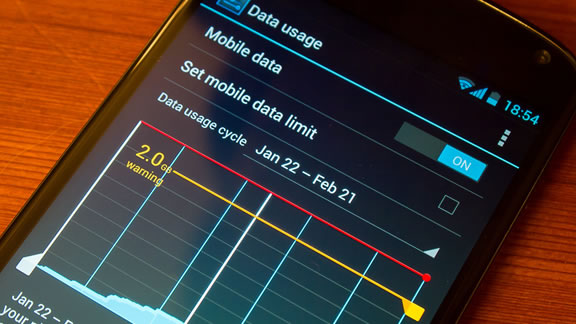
By using the Gazon mobile app or entering into your Gazon account on our website, you can monitor your usage. This enables you to monitor the amount of data you've used and prevent unforeseen fees or lags.
Make Use of Data-Saving Features
Numerous websites and apps come with built-in data-saving features. For instance, you can reduce the quality of videos on streaming sites like Netflix and YouTube in order to use less bandwidth. In a similar vein, you may disable auto-play movies when scrolling through applications like Facebook and Instagram or set them to load photographs at a reduced resolution.
You can activate data saver options for browsers like Chrome or Safari, which will compress the data being downloaded while you browse. When you have a limited data plan, this can have a significant impact.
Control Background Applications
Unbeknownst to you, several computer and phone apps use data in the background. These programs may be sending notifications, syncing, or upgrading, all of which can quickly pile up. To deal with this, you can:
1.Turn off automatic app updates (you can update apps manually when needed).
2. Disable background data for apps you don’t use often.
3. Close apps when you’re done using them.
By doing this, you can prevent unnecessary data usage and focus on the apps that matter most.
4. Download Content for Offline Use
Downloading entertainment while connected to Wi-Fi is a clever approach to conserve bandwidth whether you enjoy streaming movies, music, or podcasts. You may download content for offline use from the majority of streaming services, including Spotify, YouTube, and Netflix. In this manner, you can enjoy your favorite programs and music without depleting your internet or mobile data.
5. Consistently Check Your Data
You can easily monitor your data usage online or via our app with I-Net Services. Checking your data consumption on a daily basis is a healthy habit, particularly if you're nearing the maximum of your plan. Monitoring your usage will help you avoid surprises at the end of the month. If you see that you’re close to your limit, you can take steps to reduce your data usage before your cycle resets.
6. Make use of Wi-Fi whenever you can
Use Wi-Fi if you have access to it at home or at work! Your mobile data will be saved for when you truly need it thanks to this. Try connecting to public Wi-Fi networks while you're on the go, but be sure they're secure. You may save your mobile data for important operations like making video calls or uploading big files by connecting to Wi-Fi networks.
7. If necessary, upgrade your plan
It could be time to increase your plan if you frequently run out of data each month or require more bandwidth for demanding activities like gaming or streaming videos. From low-data plans for casual surfing to unlimited plans for heavy users, Gazon offers versatile internet plans to meet a variety of demands. Our customer support staff is always available to assist you in selecting the plan that best suits your consumption patterns.
8. Configure Alerts for Data Usage
You can set up data consumption notifications on a number of cellphones and internet service providers, including Gazon. You can set up an alert to let you know when you've used a certain percentage of your data or are getting near to your data limit. If you need to change your internet habits, this can be a useful reminder.
Conclusion
Controlling data use doesn't have to be challenging. You can ensure that you consistently get the most out of your Gazon internet service by making a few easy adjustments to your internet habits. These simple actions will help you remain within your data restrictions while enjoying fast, uninterrupted internet, whether you're using data-saving tools, downloading material for offline use, or routinely.
Keep in mind that Gazon's customer service staff is available via phone if you ever need assistance choosing a new plan or controlling your data. Our goal is to assist you in making the most of your internet subscription.
Leave a Reply
Your email address will not be published. Required fields are marked *